

Key Takeaways
Why traffic drops after a replatform, the four ways URL continuity breaks, and the order to fix them in when you are already down.
- The new platform is almost never the cause. The cause is that URLs which earned something no longer resolve to a page serving the same intent.
- Continuity breaks in four ways, and only two of them show up in a broken link report. The quiet two are the expensive ones.
- A temporary redirect does not move anything. Google states that with a 302 the source page stays in results, so the new URL never replaces it.
- The Change of Address tool expires. Google’s documentation states that after 180 days it does not recognize any relationship between the old and new sites.
- Redirects are not a cleanup task you finish. Google’s guidance is to keep them generally at least one year, and indefinitely for users.
Check the status code of every old URL that earned something
Before any opinion about the migration, run this against one old URL you know used to bring traffic.
curl -sS -o /dev/null -w “%{http_code} %{redirect_url}\n” https://yoursite.com/old-page-path
One line comes back. That line is the whole verdict on that URL.
Quick Verdict: If traffic fell after a replatform, do not start rewriting pages or auditing the new design. Export the pages that earned clicks before the launch date, status check every one of them, and fix continuity first. A website build or rebuild only pays back once the old URLs reach it. If the goal was a better site rather than a new platform, the safer route is a staged redesign that keeps URLs intact.
Here is how to read what comes back.
| What the old URL returns | Verdict | Consequence |
| 301 or 308 to the equivalent page | Correct | The permanent redirect is the signal that moves the page |
| 302, 303 or 307 | Broken | The old URL stays in results and the new one does not replace it |
| 301 to the homepage or a category | Broken | There is no equivalent content at the destination, so nothing attaches |
| 200, but the content that ranked is gone | Broken quietly | The URL resolves, so no link checker flags it |
| 404 or 410 | Broken loudly | Everything that URL earned is gone |
| Three or more hops in a chain | Degraded | Google’s own move guidance tells you to avoid chaining |
The semantics underneath are not Google’s to define. RFC 9110, HTTP Semantics, published by the IETF in June 2022 as Internet Standard STD 97, defines these redirect codes in sections 15.4.2 and 15.4.9.
The row most sites fail on is the third. The row almost nobody checks is the fourth.
Do this: Run the command above against five old URLs you can name from memory right now. If any returns anything other than a single permanent redirect to a matching page, you have found the cause and you can stop looking for it.
Build the continuity ledger before you touch anything else
You cannot fix continuity for URLs you cannot list. Getting the list is the first real task, and the window for getting it is finite.

Google Search Console’s Performance report documentation confirms the report does exactly this. It states that “Data grouped by Pages or Search appearance is aggregated by page”, and that “Many reports provide an export button to download both the chart and table data”.
Export it, set the date range to end the day before launch, and sort by clicks. That export is the spine of the recovery.
If the migration happened long enough ago that the report no longer covers it, the Internet Archive is the fallback. Its own help pages give the pattern for listing everything it holds for a domain, which is http://web.archive.org/*/www.yoursite.com/*. The archive is explicit that it will no longer pack up lost sites for you, so treat this as a way to recover a URL list rather than a backup.
Now add three columns to the export: the intended new URL, the status code the old URL actually returns, and whether the destination still contains the content that earned the clicks. That table is THE CONTINUITY LEDGER, and it is the only document in this process that is worth protecting. Teams moving off a hosted builder face the same problem in a sharper form, which is why a no-code to custom code move should start with the URL inventory rather than the feature list.
Do this: Export the Pages tab today, ending the day before your migration date. Do it before anything else, because the report window moves forward and the pre-launch data does not come back.
Know the four ways continuity breaks
Four distinct failures all present as the same chart. Two of them appear in any crawl report. Two of them do not.

| Break | What it looks like | How you detect it |
| No redirect | The old URL returns 404 | The status check |
| Wrong target | The old URL permanently redirects to the homepage or a category | Compare the intent of the old page against its destination |
| Soft break | A 302, a delayed meta refresh, or a redirect that only runs in JavaScript | Status check, then fetch the page again with JavaScript disabled |
| Same URL, content cut | A 200 response, but the section that earned the ranking was dropped in the rebuild | Compare the archived version against the live one, line by line |
Google’s redirect documentation is specific about the third one. With a permanent redirect, “the indexing pipeline uses the redirect as a signal that the redirect target should be canonical”. With a temporary one the source page remains in results, which means a 302 across a whole site moves nothing at all while looking like it works in a browser.
The same page is blunt about JavaScript redirects, saying to use them only when server side and meta refresh are both impossible, and warning that “Google might never see it if rendering of the content failed”. A redirect a crawler cannot execute is not a redirect.
The fourth break is the one that costs the most and gets diagnosed last. A rebuild tightens the copy, drops the comparison table, cuts the FAQ, and ships. The URL is fine. The page is not the page that ranked. This is exactly the failure a redesign with the rankings kept intact is organized to prevent.
Do this: Take your three highest-click old URLs and open the archived version beside the live one. Write down anything present in the old version and missing in the new.
Redirect to the equivalent page, not the homepage
Mapping every old URL to the homepage is the most common migration shortcut and it transfers almost nothing.

Google’s guidance for a move with URL changes names the artifact directly. It recommends “server side permanent redirects from the old URLs to the new URLs as you indicated in your mapping”. The mapping is assumed to exist. If yours does not, that is the gap.
Two operational details from the same page matter more than they sound. It says to avoid chaining redirects and to stay within roughly three hops, which is easy to breach when a migration sits on top of an earlier one. And it says to submit the new sitemap in Search Console, after which the old sitemap can be removed.
Equivalence is a judgment call and it is yours to make, not a tool’s. A product page that no longer exists maps to the closest replacement product, not to the category listing. A retired blog post maps to the post that supersedes it, not to the blog index. If there is genuinely no equivalent, a 404 is more honest than a redirect to something unrelated, and it stops you pretending the signal survived.
My read on the homepage shortcut: it is popular because it clears the 404 report, and clearing the 404 report is not the goal. The goal is that a person arriving from a four year old link finds what the link promised.
Forms, tracking and anything calling an external service deserve their own row in the ledger, because a migration breaks those silently too and nobody notices until a month of leads is missing. If your old site posted to a CRM, re-verify every integration endpoint against the new build before you call the move finished.
Do this: Open your redirect map and count how many rows point at the homepage or a category page. Fix those rows first, highest clicks at the top.
Work the recovery in this order
If traffic is already down, sequence matters more than effort. This is THE RECOVERY ORDER.
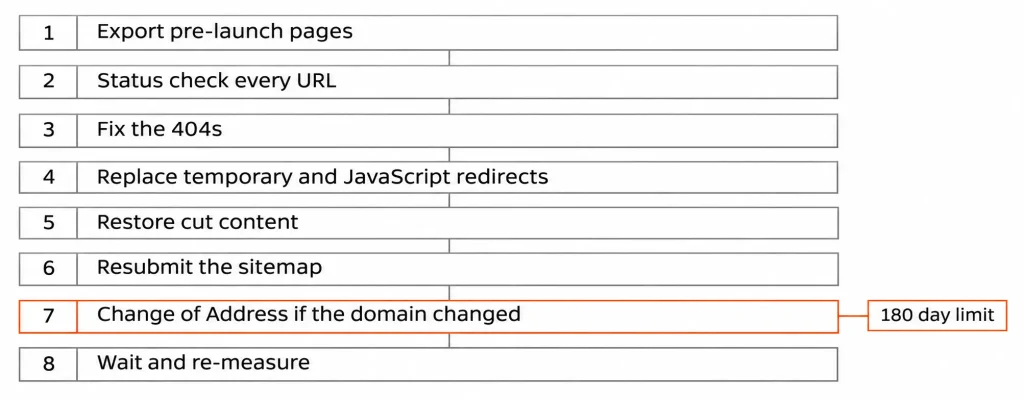
| Order | Action | Why it sits here |
| 1 | Export the pages that earned clicks before launch | The pre-launch window does not come back |
| 2 | Status check every exported URL | One line of truth per URL |
| 3 | Fix every 404 with a permanent server side redirect to the equivalent page | Highest recovered value per hour of work |
| 4 | Replace temporary and JavaScript redirects with permanent server side ones | These are currently transferring nothing |
| 5 | Restore content cut from URLs that return 200 | Invisible to every automated checker |
| 6 | Resubmit the new sitemap, then remove the old one | Google’s stated step in the move process |
| 7 | Submit Change of Address, if and only if the domain changed | It expires, see the next section |
| 8 | Wait, then re-measure against the same export | Recrawling is not instant |
On step eight, Google sets the expectation itself. Its move documentation states that “As a general rule, a small to medium-sized website can take a few weeks for most pages to move”, and that you may experience ranking fluctuations while it recrawls and reindexes. It also notes that Googlebot has to visit every old and new URL at least once before the move counts as complete.
So do not judge the recovery in week one. Judge it against the same pre-launch export, four to six weeks after the redirects are correct, URL by URL rather than by the total line on the chart.
We sequence our own builds the same way, with the redirect map written before the first page is designed rather than after the launch date is booked. It is the one task that gets cheaper the earlier it happens and more expensive every week it waits.
Do this: Write the eight steps into a shared document with an owner’s name against each, then start at step one even if someone has already started at step five.
Use the Change of Address tool inside its 180 day window
This is the fact most migration guides leave out, and it has a hard edge.

Google’s documentation for the tool is precise about four things. It applies only when you move “from one domain or subdomain to another”, and not to an HTTP to HTTPS change, a www switch on the same domain, or a path change within a domain. It “can be used only on properties at the domain level”. You “must be an owner of both the old and new properties in Search Console”.
The fourth is the one with teeth. The documentation states that these actions “continue for 180 days after you start migration in Search Console”, and that “After the 180 day period, Google does not recognize any relationship between the old and new sites”.
Read that twice if you replatformed more than six months ago. The tool is not a repair you can apply late. It is a signal with a shelf life, and if the window has closed your recovery rests entirely on the redirects.
Two more limits from the same page. The tool “does not move any subdomains below the specified domain (including www)”, and “Google does not erase the old site from the index”, so old URLs can keep appearing in results for a while. Neither is a malfunction.
Do this: Check the date you launched. If you changed domains and it was under 180 days ago, submit the Change of Address this week. If it was longer, skip step seven and put that effort into the redirect map.
Run the pre-flight list if you have not migrated yet
Everything above is cheaper to do before launch than after. This is the whole list.

BBefore you launch, do all five of these:
- Export the Pages tab from Search Console and freeze it as the baseline.
- Build a one-to-one map from every exported URL to a specific new URL, with no row pointing at the homepage.
- Read the map by hand and check that each destination serves the same intent as its source.
- Test the redirects on staging with the status check command, and check them again with JavaScript disabled.
- List every form, tracking tag and outbound integration on the old site, and confirm each one on the new build.
Keep the redirects afterward. Google’s guidance is to keep them “for as long as possible, generally at least 1 year”, and it suggests keeping them indefinitely for the sake of users. A redirect you remove in month four is a 404 in month five.
One thing to decide before any of this: whether you need a new platform at all. Replatforming to fix a design problem imports all the continuity risk and solves none of the design. An agency doing B2B website work should be able to tell you which of the two you actually have, and we will say so even when the answer is that your current platform is fine.
Do this: If your launch date is set, move it back by the number of days it takes to build and hand-review the one-to-one map. That is the cheapest day you will ever buy.
What a recovery cannot restore
Some of this does not come back, and the honest version is worth more than an optimistic one.

External links are the clearest loss. If other sites linked to a URL that has returned 404 for months, some of those links have already been removed or edited by their owners, and a redirect added now cannot bring back a link that no longer exists.
The Change of Address window is the second. Once 180 days have passed, Google’s documentation says the relationship is not recognized, and no later submission reopens it.
The third is your own measurement baseline. If the Search Console report no longer reaches back past your launch date, you have lost the ability to prove which URLs earned what, and the Internet Archive gives you URLs without giving you their click data.
I cannot tell you how much of your traffic returns. Nobody can, and a recovery quote that names a percentage is selling you a number it cannot produce. What is knowable is which URLs are broken, in which of the four ways, and in what order to fix them.
Where we fit: if you have the export and the status check results and want someone to build and verify the map, that is a contained piece of work and the first step is Get your build plan, which is complimentary, comes back in two business days and includes the scope, the stack, the cut list with reasons, a fixed price and a launch date. No sales call. We are the wrong call if your status check comes back clean, because then the drop has another cause and a migration specialist will waste your money looking for it. Our published project write-ups show the kind of work we take on. Get your build plan and send the status check output with it, which is a faster first step than a discovery call.
Do this: Run the status check, then decide. Not before.
Frequently Asked Questions
How long should traffic take to recover after the redirects are fixed?
Google states that a small to medium site generally takes a few weeks for most pages to move, and that Googlebot must visit every old and new URL at least once first. Measure four to six weeks after the redirects are correct, against your pre-launch export, URL by URL rather than by total sessions.
Can I redirect old URLs to the homepage if there is no equivalent page?
A permanent redirect to the homepage leaves nothing at the destination for the signal to attach to, so it mostly clears your 404 report without recovering anything. Where no equivalent exists, letting the URL return 404 is more honest and keeps your ledger accurate. Reserve redirects for genuine one-to-one matches.
Do I need the Change of Address tool for an HTTP to HTTPS move?
No. Google’s documentation says explicitly not to use the tool for HTTP to HTTPS changes, www switches on the same domain, or path changes within a domain, and that Google will work those out on its own. The tool applies only to a move between domains or subdomains, at the domain property level.
How long do I have to keep the redirects in place?
Google’s move guidance is to keep them for as long as possible and generally at least one year, and it suggests keeping them indefinitely for users. Treat the redirect map as permanent configuration rather than a migration task with an end date. Removing a redirect later recreates the original 404.
What if the traffic drop was not the migration at all?
Run the status check first, because it is cheap and binary. If every old URL returns a single permanent redirect to a matching page with its content intact, the migration is not the cause and you should look at the dates instead, comparing your launch date against anything else that changed in the same week.
Resources
- Site moves with URL changes, Google Search Central, page last updated 20 August 2026. The recommendation of server side permanent redirects from a mapping, the guidance to avoid chaining, the sitemap steps, the few weeks expectation, and the instruction to keep redirects generally at least one year.
- Redirects and Google Search, Google Search Central, page last updated 14 April 2026. How permanent redirects become a canonical signal, why temporary ones leave the source page in results, and the warning that a JavaScript redirect may never be seen.
- Change of address tool, Google Search Console Help. The domain-level and ownership prerequisites, the 180 day window, the statement that the relationship is not recognized afterward, and the subdomain and index limits.
- Performance report, Google Search Console Help. Grouping by page and the export of chart and table data, which is how the continuity ledger gets built.
- RFC 9110, HTTP Semantics, IETF, June 2022, Internet Standard STD 97. The binding protocol document that defines the redirect status codes in sections 15.4.2 and 15.4.9, underneath any search engine’s guidance about them.
- Using the Wayback Machine, Internet Archive. The wildcard pattern for listing everything archived for a domain, and the explicit statement that the archive no longer packs up lost sites.